YouTube Channel Not Getting Views? Here Are 5 Things to Check Before You Quit
May 27, 2026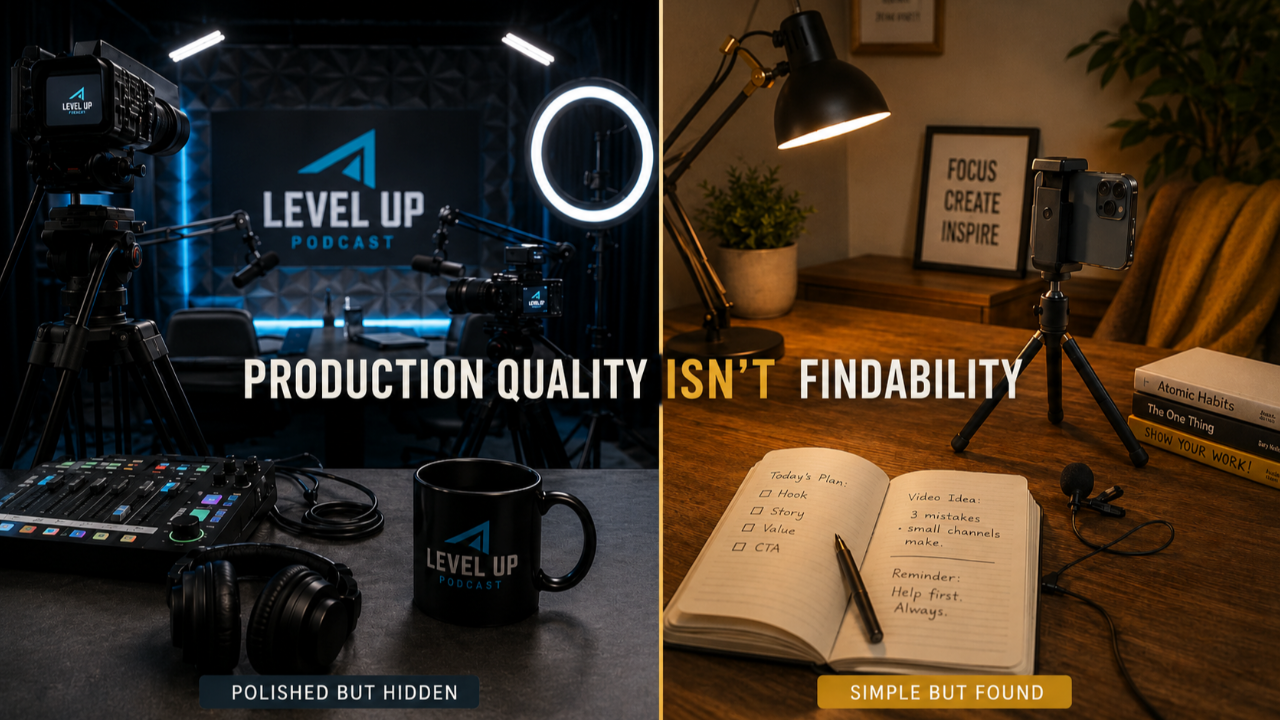
A YouTube channel not getting views is almost always a setup and metadata problem, not a content quality problem. If you’ve been filming consistently and the view count isn’t moving, the most likely explanation is that YouTube doesn’t have the technical signals it needs to recommend your content to the people searching for exactly what you teach.
I see this constantly with service-based business owners. They’re doing the hard part. Showing up, filming, posting. The people who find their videos love them. But the view count flatlines between email pushes, and they start wondering if YouTube is even worth their time.
I recently completed a channel audit for a business owner with a year’s worth of solid content and almost no organic discovery. Every video got traffic from her email list and social shares. Almost nothing came from YouTube search or suggested videos. The fixes were structural. She didn’t need to change what she was teaching. She needed to change how YouTube could find it.
Here are the five things I check first when a YouTube channel is not getting views.
1. Your Channel Keywords Are Empty or Too Broad
YouTube channel keywords are phrases that tell the platform what your entire channel covers, and they’re separate from individual video tags. Most business owners either leave this field empty or fill it with single words like “marketing” that don’t give YouTube anything useful to work with.
The difference matters. “Marketing” tells YouTube nothing. “YouTube strategy for service businesses” and “local business visibility Southwest Riverside County” give it something specific to match against.
How to check: Open YouTube Studio. Click Settings (the gear icon), then Channel, then Basic Info. The Keywords field is right there. If it’s blank, YouTube has been guessing what your channel is about since the day you created it. Add 5 to 10 phrases that describe your expertise, industry, and geographic service area.
2. Your Video Descriptions Are Too Short to Index
YouTube reads your video description the way Google reads a web page. A two-sentence description that says “In this video I share marketing tips” gives YouTube almost nothing to index against search queries.
A strong YouTube video description is 200 to 500 words and includes the main topic in the first two lines, related search terms, timestamps for key sections, and links to relevant resources. Every word in your description is searchable content that helps YouTube match your video to the right queries.
Think of it this way: the first two lines show before the “Show More” button. That’s the only part most viewers see. Put your topic and your keyphrase there. Everything below the fold is for YouTube’s search engine, and it reads all of it.
3. Your Tags Describe You, Not What People Search For
Video tags carry less weight than they used to, but they still help YouTube understand ambiguous content. The mistake I see most often: business owners tag from their own perspective instead of the searcher’s perspective. And sometimes it’s not even the business owner doing it. I recently audited a channel where a professional studio was handling the publishing, and one of the tags they’d entered was “womeninbusiness” with no spaces. Not “women in business” as a phrase YouTube could read. The letters smushed together like a hashtag. YouTube couldn’t even recognize it as English.
If you filmed a video about home security, tags like “security” and “safety” are too vague to match real searches. Tags like “home security tips for families,” “how to prevent break ins,” and “best home security system 2026” match what real people actually type into the search bar.
The gap between how you describe your work and how your ideal client searches for help is exactly where views get lost.
4. YouTube Isn’t Sending You Traffic (Your Email List Is)
This is the one that surprises people. Open YouTube Studio, go to Analytics, then click the Traffic Sources tab. You’ll see exactly where your views come from.
If the majority say “External” (your email list, social media links, your website) and almost nothing says “YouTube Search” or “Suggested Videos,” you’re looking at a channel YouTube isn’t distributing. You’re doing all the marketing work yourself. Every video is a manual push instead of an asset that works while you sleep.
When a YouTube channel’s traffic sources show mostly external views with minimal YouTube Search or Suggested Video traffic, that pattern indicates the channel’s metadata and setup need attention, because YouTube’s own discovery systems aren’t able to distribute the content.
External views are good. They mean your existing community is engaged. But the whole point of YouTube is that it’s a search engine that recommends content on your behalf. If it’s not doing that, something structural needs to change.
5. AI Search Tools Can’t Find Your Videos Either
This is the piece most business owners haven’t thought about yet. ChatGPT, Perplexity, and Google’s AI Overview are pulling video content into their answers. When someone asks an AI tool “who helps business owners with YouTube strategy,” the AI looks for content that’s clearly structured, well-described, and topically specific.
Answer engine optimization (AEO) is the practice of structuring content so AI-powered search tools can find, understand, and cite it. For YouTube channels, this means titles, descriptions, and channel setup need to clearly communicate what you do and who you serve.
If your YouTube channel isn’t getting views from organic search, it’s almost certainly invisible to AI search tools, too. A well-structured channel doesn’t just show up in YouTube search. It shows up when AI tools direct people to experts in your field. I wrote a full breakdown of how AEO works for business owners in my post on answer engine optimization for business owners.
Your Content Isn’t the Problem. Your Findability Is.
I worked with a business owner who was paying a professional podcast studio to produce and publish her videos. Beautiful setup. Great gear. Multiple cameras. The studio even handled uploading to her YouTube channel as part of the package. It looked like she was doing everything right.
But when I pulled up her channel data, the basics were missing. No channel keywords. Thin descriptions. Tags that didn’t match what anyone was searching for. The studio had charged her to create content that gets found, and then skipped the part that actually gets you found. Publishing a video to YouTube is uploading a file. That’s not a service. That’s a task. Findability is the service, and it wasn’t happening.
Meanwhile, a business owner recording on an iPhone with a tripod and a $20 wireless lav mic, someone who understood how to package her content for search, was getting more organic discovery than the one with the professional production. Not because her content was better. Because her content was findable.
Here’s the part that bothers me. By the time most business owners realize their setup is the problem, they’ve already spent their marketing budget on production that looked great but didn’t get found. The money that could have gone toward findability went toward looking professional. Those aren’t the same investment, and too many people learn that the hard way.
If you’ve been showing up and filming, you’ve already done the hard part. Your content is probably better than you think. The views aren’t missing because the content is bad. They’re missing because YouTube doesn’t have the information it needs to put that content in front of the right people. That’s a fixable problem.
Every video you post with a misconfigured setup is a video YouTube will never recommend. Fixing these five things doesn’t require starting over or buying better equipment. It requires looking under the hood and adjusting what’s already there.
You wouldn’t diagnose your own plumbing. Sometimes the smartest move is letting someone who reads this data every day look at your specific channel and tell you exactly what’s off.
Frequently Asked Questions
Why is my YouTube channel not getting views even though I post consistently?
Consistency helps, but it doesn’t replace strategy. If your channel keywords are missing, your descriptions are too short, and your tags don’t match what people actually search for, YouTube can’t categorize or recommend your content. Consistent posting into a broken setup means you’re producing content YouTube doesn’t know how to distribute.
How do I check if YouTube is actually recommending my videos?
Go to YouTube Studio, then Analytics, then Traffic Sources. If most of your views come from External sources (email, social media) rather than YouTube Search or Suggested Videos, YouTube’s discovery systems aren’t distributing your content. That’s a signal your metadata needs work.
What are YouTube channel keywords and where do I find them?
Channel keywords are phrases that tell YouTube what your overall channel covers. They’re separate from individual video tags. Find them in YouTube Studio under Settings, then Channel, then Basic Info. Add 5 to 10 specific phrases that describe your expertise, industry, and service area.
Can AI search tools like ChatGPT find my YouTube videos?
Yes, when your content is clearly structured and properly described. AI answer engines pull from YouTube content with clear titles, detailed descriptions, and topical specificity. If your channel isn’t optimized for regular YouTube search, it’s likely invisible to AI-powered search tools as well.
How long does it take to fix a YouTube channel that isn’t getting views?
The structural fixes (channel keywords, descriptions, tags) can be done in an afternoon. YouTube’s algorithm takes time to reindex and recategorize your content after changes, so you won’t see results overnight. Most business owners start noticing a shift in traffic sources within 4 to 8 weeks of making these changes consistently across their existing videos.
Get the Strategy That Works While You Work
One email per week. No trends to chase. Just YouTube strategy built for business owners who would rather be found than famous. Written by Kathy Sizemore, YouTube Strategist for Business Owners, from nearly 30 years of running a real business.
No spam. No daily posting advice. Just real strategy from someone who actually runs a business. You can unsubscribe anytime, but you probably won't want to.
Author