How to Repurpose One YouTube Video into 25 Pieces of Content (Without a Team)
Jun 03, 2026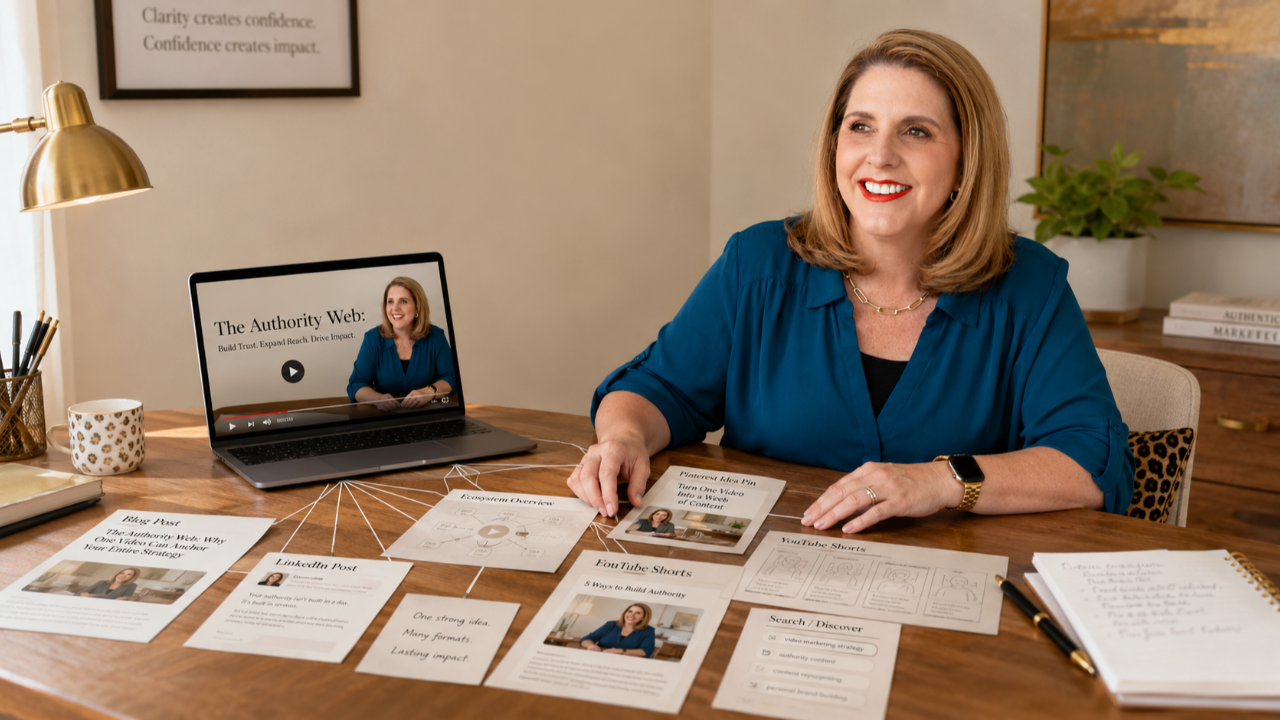
You can repurpose one YouTube video into 25 or more pieces of content across every platform your business needs to be on, all without hiring a content manager or a social media agency. The method I use is called the Authority Web, and it's built specifically for business owners who don't have time to create original content for six platforms every week.
This is for you if someone has told you that you need to post on YouTube, Instagram, LinkedIn, email, Pinterest, your blog, and Facebook every single week to grow your business, and you thought: that's impossible. I have a business to run. You're right. You can't do all of that and run a business and have time for your family, serve your community, and have time for yourself. That math doesn't work.
But what if you didn't have to start from scratch on every platform? What if one piece of content could feed everything else?
Why Most Business Owners Hit a Content Wall
The advice most business owners get about content sounds reasonable on the surface. Post consistently on social media. Build an email list. Start a blog. Be on every platform where your ideal clients hang out. Each piece of advice makes sense on its own. Stack them all together, and you've got a full-time content job on top of the business you're already running.
I call this the content hamster wheel. A different idea for every platform, every day, from scratch. You're constantly coming up with new topics, new angles, new hooks. Nothing connects to anything else. Every Monday feels like you're starting over. That's how you burn out. And that's the opposite of what I do.
The content hamster wheel treats every platform as a separate demand. The Authority Web treats every platform as a different delivery method for the same core idea.
If you want to understand why this problem is so common for experienced business owners specifically, my video on why the most qualified business owners are the least visible online explains the root of it.
How to Repurpose a YouTube Video into Content Using the Authority Web
Here's the system I use every single week. I create one video. One. And that video becomes 25 pieces of content across every platform I need to be on.
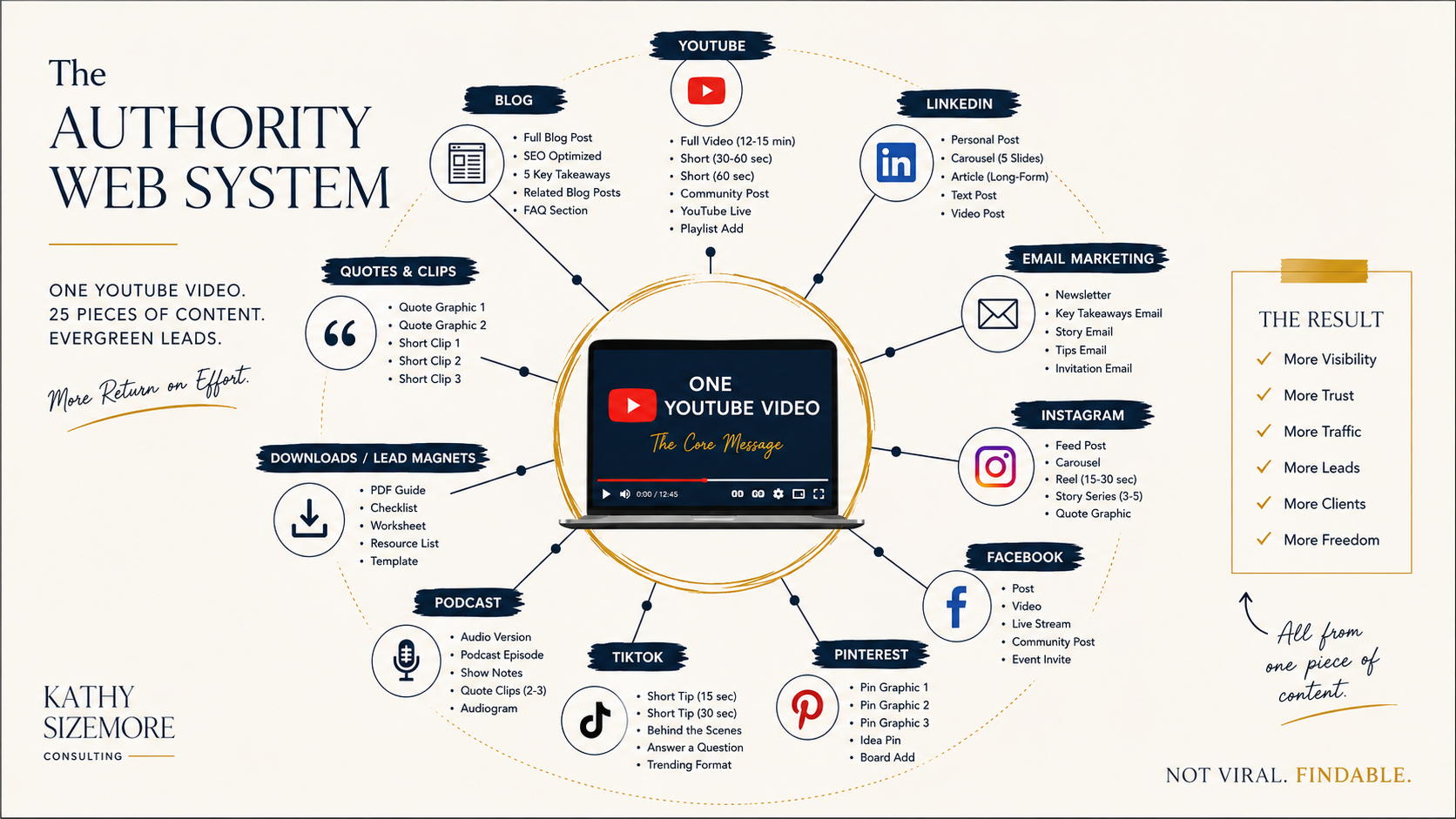
The Authority Web puts one YouTube video at the center, and everything else connects back to it. The video is the anchor. From that single video, I pull out blog posts, newsletter articles, LinkedIn articles and posts, Instagram captions and reels, Pinterest pins, Substack notes, and email content. Each piece is adapted for the platform it lives on, but every piece traces back to the same core idea, the same core message.
This isn't copying and pasting the same thing everywhere. It's taking one well-developed idea and shaping it for different audiences and different formats. A two-minute Instagram reel doesn't look like a 1,000-word LinkedIn article, and it shouldn't. But they can absolutely come from the same source material.
For example, when I published a video about home security searches on YouTube, that same video fed a blog post, a newsletter section, several Instagram posts, and Pinterest pins, all pointing back to one original piece of work. One filming session. One core message. Everywhere.
The Reason This System Works for Business Owners
The reason this works is that it's a system, not a to-do list. A to-do list gives you tasks without a framework. A system gives you a repeatable process where every step connects to the one before it.
When you repurpose a YouTube video into content using this approach, you're not just saving time. You're building a web of visibility where every piece reinforces every other piece. Someone finds your Pinterest pin and clicks through to the blog post. Someone reads your LinkedIn article and watches the YouTube video. Someone gets your newsletter and forwards it to a colleague. All of it points back to the same place.
Social media rewards the newest content. You post something, it gets a little attention, and then it disappears. YouTube works differently. YouTube is a search engine. The video you post today can still be getting found two years from now because someone typed a question into the search bar and your video answered it. That's the difference between planting something and tossing something. Social media is tossing. YouTube is planting.
When you build your content system around the thing that compounds, the YouTube video, everything you repurpose from it lasts longer too. The blog post gets indexed by Google. The LinkedIn article builds your professional credibility over months. The Pinterest pin keeps circulating.
What 25 Pieces of Content Actually Looks Like
Here's a practical breakdown of what comes out of a single video each week. The YouTube video itself is piece number one. From the transcript, I write a blog post (that's two), a Substack article (three), and a LinkedIn article (four). From the key ideas in the video, I create two to three LinkedIn posts (five through seven), two Instagram carousels (eight and nine), three to four Instagram static posts (ten through thirteen), and two to three Instagram reels pulled from the video footage (fourteen through sixteen).
I write a newsletter section for my email list (seventeen), create two to three Pinterest pins (eighteen through twenty), draft Substack notes (twenty-one and twenty-two), write a few Threads posts (twenty-three and twenty-four), and pull a Facebook post or two (twenty-five, sometimes twenty-six).
Some weeks I get more, some weeks a little less. The specific number isn't the point. The point is that I'm not inventing 25 separate ideas. I'm taking one idea and giving it 25 different expressions.
I Do This Myself
I want to be clear about something: I do this myself. I'm not hiring a content manager or a social media agency. This is me, running two businesses, creating one video a week, and using that video to show up everywhere my ideal clients are looking.
That's a system. The system does the work. I just feed it one good idea per week, and it distributes that idea across my entire presence.
Could you hire someone to help? Of course. But the whole reason I built this was because I needed something that worked without a team. If you're a solo business owner or running a small operation, this approach means you don't have to choose between creating content and running your business. You can do both, because they're the same workflow.
If you want to build the foundation before any repurposing system makes sense, my free Start Smart on YouTube course walks you through exactly where you stand right now, your readiness score, your visibility gaps, your content pillars, and your first real video idea. It's the clarity layer that makes everything else click into place.
And when you're ready to film, the YouTube Jumpstart takes everything from Start Smart and gets you to five filmed videos in 30 days.
The Content Hamster Wheel vs. the Authority Web
The opposite of the Authority Web is the content hamster wheel. A different idea for every platform, every day, from scratch. No connecting thread. No system. Just a spinning wheel that never stops demanding your attention.
On the hamster wheel, Monday means coming up with an Instagram idea. Tuesday means writing a LinkedIn post from scratch. Wednesday means filming a video on a completely different topic. Thursday means writing a newsletter that has nothing to do with any of it. By Friday, you're exhausted and you haven't moved the needle on any single message.
The Authority Web flips that. One topic per week, explored from every angle, delivered to every platform. Your audience hears a consistent message no matter where they find you. And you stop starting from zero every single day.
Frequently Asked Questions
Can I repurpose a YouTube video into content if I'm just starting my channel?
Yes. Building your repurposing system from the beginning means you'll get more value out of every video you create. Even with a small channel, each video can feed your blog, your newsletter, your social media, and your Pinterest presence. You don't need a large audience to benefit from this approach.
How long does it take to repurpose one video into 25 pieces of content?
The first time you do it, expect a full day. Once you have the system in place, most business owners can batch their repurposing in four to six hours per week. That's less time than most people spend creating content from scratch for a single platform.
Do I need special software to repurpose my YouTube videos?
No specialized tools are required. If you can write a blog post and create social media captions, you can repurpose your videos. A transcription tool helps, and basic design software for social graphics is useful. The system itself doesn't depend on expensive software or complicated workflows.
What if my YouTube videos don't get many views yet?
The Authority Web isn't about maximizing YouTube views. It's about using one piece of content to fuel your entire presence. Even a video with 20 views can become a blog post that ranks in Google, a LinkedIn article that gets shared in your industry, and an Instagram carousel that reaches people who would never have found the video on their own. The video is the seed, not the only harvest.
How is repurposing different from just posting the same thing everywhere?
Repurposing isn't reposting. Each piece of content gets shaped for the platform it lives on. An Instagram reel is 60 seconds and visually driven. A LinkedIn article is 800 words and professionally framed. A Pinterest pin is a searchable image with a keyword-rich description. They all come from the same idea, but each one is built for different contexts and different reader behaviors. That's what makes the Authority Web work.
Ready to know exactly where you stand on YouTube? Start with the free Start Smart on YouTube course and walk away with a real plan.
Get the Strategy That Works While You Work
One email per week. No trends to chase. Just YouTube strategy built for business owners who would rather be found than famous. Written by Kathy Sizemore, YouTube Strategist for Business Owners, from nearly 30 years of running a real business.
No spam. No daily posting advice. Just real strategy from someone who actually runs a business. You can unsubscribe anytime, but you probably won't want to.
Author